HTML Lesson 7 HTML Editors


HTML Editors

Learn HTML Using Notepad or TextEdit

Web pages can be created and modified by using professional HTML editors.

However, for learning HTML we recommend a simple text editor like Notepad (PC) or TextEdit (Mac).

We believe in that using a simple text editor is a good way to learn HTML.

Follow the steps below to create your first web page with Notepad or TextEdit.


Step 1: Open Notepad (PC)

Windows 8 or later:

Open the Start Screen (the window symbol at the bottom left on your screen). Type Notepad.

Windows 7 or earlier:

Open Start > Programs > Accessories > Notepad


Step 1: Open TextEdit (Mac)

Open Finder > Applications > TextEdit

Also change some preferences to get the application to save files correctly. In Preferences > Format > choose "Plain Text"

Then under "Open and Save", check the box that says "Display HTML files as HTML code instead of formatted text".

Then open a new document to place the code.


Step 2: Write Some HTML

Write or copy the following HTML code into Notepad:

<!DOCTYPE html>
<html>
<body>

<h1>My First Heading</h1>

<p>My first paragraph.</p>

</body>
</html>
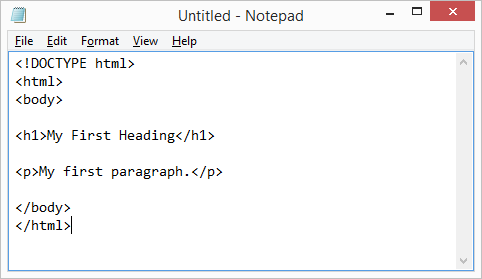
Notepad


Step 3: Save the HTML Page

Save the file on your computer. Select File > Save as in the Notepad menu.

Name the file "index.htm" and set the encoding to UTF-8 (which is the preferred encoding for HTML files).
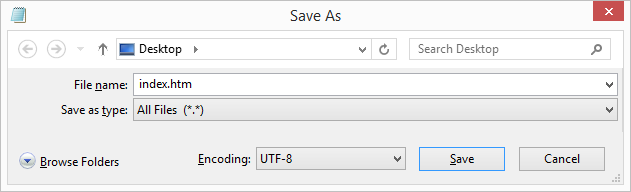
View in Browser

Tip: You can use either .htm or .html as file extension. There is no difference, it is up to you.


Step 4: View the HTML Page in Your Browser

Open the saved HTML file in your favorite browser (double click on the file, or right-click - and choose "Open with").

The result will look much like this:
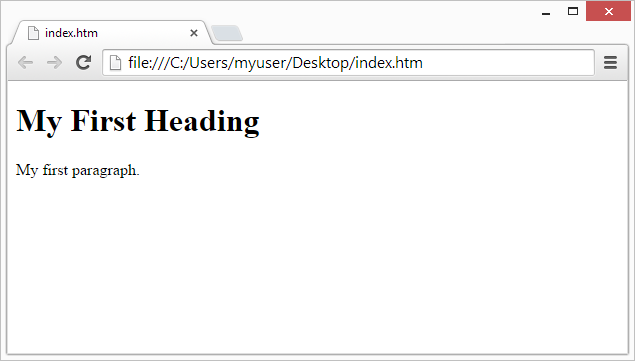
View in Browser


HTML History


HTML History

Since the early days of the World Wide Web, there have been many versions of HTML:

YearVersion
1989Tim Berners-Lee invented www
1991Tim Berners-Lee invented HTML
1993Dave Raggett drafted HTML+
1995HTML Working Group defined HTML 2.0
1997W3C Recommendation: HTML 3.2
1999W3C Recommendation: HTML 4.01
2000W3C Recommendation: XHTML 1.0
2008WHATWG HTML5 First Public Draft
2012WHATWG HTML5 Living Standard
2014W3C Recommendation: HTML5
2016W3C Candidate Recommendation: HTML 5.1
2017W3C Recommendation: HTML5.1 2nd Edition
2017W3C Recommendation: HTML5.2

This tutorial follows the latest HTML5 standard.

HTML Page Structure


HTML Page Structure

Below is a visualization of an HTML page structure:

<html>
<head>
<title>Page title</title>
</head>
<body>
<h1>This is a heading</h1>
<p>This is a paragraph.</p>
<p>This is another paragraph.</p>
</body>
</html>

Note: The content inside the <body> section (the white area above) will be displayed in a browser. The content inside the <title> element will be shown in the browser's title bar or in the page's tab.

Learn HTML - Lesson 4 Web Browsers


Web Browsers

The purpose of a web browser (Chrome, Edge, Firefox, Safari) is to read HTML documents and display them correctly.

A browser does not display the HTML tags, but uses them to determine how to display the document:


HTML Element


What is an HTML Element?

An HTML element is defined by a start tag, some content, and an end tag:

<tagname> Content goes here... </tagname>

The HTML element is everything from the start tag to the end tag:

<h1>My First Heading</h1>
<p>My first paragraph.</p>
Start tagElement contentEnd tag
<h1>My First Heading</h1>
<p>My first paragraph.</p>
<br>nonenone

Note: Some HTML elements have no content (like the <br> element). These elements are called empty elements. Empty elements do not have an end tag!

My First HTML Document

 A Simple HTML Document  Example


<html>

<head>

<title>Page Title</title>

</head>

<body>


<h1>My First Heading</h1>

<p>My first paragraph.</p>


</body>

</html>


Example Explained

The  declaration defines that this document is an HTML5 document

The <html> element is the root element of an HTML page

The <head> element contains meta information about the HTML page

The <title> element specifies a title for the HTML page (which is shown in the browser's title bar or in the page's tab)

The <body> element defines the document's body, and is a container for all the visible contents, such as headings, paragraphs, images, hyperlinks, tables, lists, etc.

The <h1> element defines a large heading

The <p> element defines a paragraph</title></head></html></div>


HTML Lesson 1 HTML Introduction

HTML is the standard markup language for creating Web pages. What is HTML? HTML stands for Hyper Text Markup Language HTML is the standard markup language for creating Web pages HTML describes the structure of a Web page HTML consists of a series of elements HTML elements tell the browser how to display the content HTML elements label pieces of content such as "this is a heading", "this is a paragraph", "this is a link", etc. A Simple HTML Document Example Page Title

My First Heading

My first paragraph.

my investment in equity

 Date 29/09/2019 at Dayend


Date 30/092020

Dated 5/10/2020
6/10/2020